After last mini-coding adventure where I was exploring a simple command-line browser idea I had there was a comment by @sod that mentioned I might enjoy looking into Gopher or Gemini as alternative protocols to http… and he was 100% correct 😁
Making a blueprint 🗺️
After exploring some gemini sites (called capsules) I decided I wanted one. But… I didn’t want to make extra work for myself by having to publish blog posts in two different places using two different tools. So I thought of two options. One, make a gemini server that could host my capsule and fetch my blog posts or two, I could go the other way. Make a gemini server, write posts in gemini syntax (.gmi) and then have them uploaded to my blog.
I decided to go with the first option.
1.) A scale model 📡
First thing first. I needed to get something running locally. I already had a gemini client installed called Lagrange and I’ve been using Deno quite a bit for hobby projects. Luckily someone else had made a Gemini server middleware that I could use.
First was the command to create the certificates needed
openssl req -x509 -newkey rsa:4096 -keyout key.pem -out cert.pem -days 3650 -nodes
And then I moved them into a cert subfolder I made in my project folder.
Next up was the main.js file and the handful of lines needed.
import { Application } from 'jsr:@arma/qgeminiserver@2.0.3';

const
keyPath  = Deno.env.get('KEY_PATH')  || '../cert/key.pem',
certPath = Deno.env.get('CERT_PATH') || '../cert/cert.pem',
key      = await Deno.readTextFile(keyPath),
cert     = await Deno.readTextFile(certPath),
app      = new Application({key, cert});

app.use(ctx => {
  ctx.response.body = '# Hello World!'
});

await app.start();
I ran this file with the deno run --allow-env --allow-read --allow-net main.js command and there, in my Lagrange client after navigating to gemini://localhost/, was “Hello World”…beautiful 🤩
Getting my existing blog posts with Micropub
There are many things I like about using Micro.blog as my blog host. One of the big ones is the API and the Micropub implementation. In case you’re not familiar, Micropub is an open web standard for creating, editing, and deleting posts/pages from a website. So I just need a valid token and the location of my Micropub endpoint and the world is my oyster 🦪… well, at least my blog posts are… 🤣
So, Micro.blog has a spot on its website where I can generate app tokens and the micropub endpoint is in the HTML head of my blog’s index page. I grabbed those two items and stuck them in an .env file. Once there I could access them easily in Deno. var token = Deno.env.get('token') and var micropub = Deno.env.get('micropub'). I also needed the destination I was calling in Micropub, this is needed since I have several different blogs hosted and it needs to know which one I’m talking about. In this case, https://heyloura.com. var destination = Deno.env.get('destination'). I just declared each of these at the top of the file.
I replaced the route that was serving “Hello World” with a fetch request.
...
app.use(ctx => {
  const fetching = await fetch(`https://micro.blog/micropub?q=source&limit=10&mp-destination=${encodeURIComponent(destination)}`, { method: "GET", headers: { "Authorization": "Bearer " + token } } );
  const results = await fetching.json();
  let page = '';
  results.items.filter(p => p.properties["post-status"][0] == 'published').map((item, i) => {
    page = page + item.properties["content"][0] + '\r\n\r\n';
  });

  ctx.response.body = page
});
...
I needed to filter out my draft posts, which is why there is a filter call with .filter(p => p.properties["post-status"][0] == 'published') and the content of each post is under item.properties["content"][0]. Now for this sample, I simplified the code. In actuality I added extra text, emojis, links to named blog posts (instead of just outputting) the content. You get the idea.
I once again saved and ran the run command and viola! I had a nice list of blog posts. Or at least that’s what I thought would happen… Instead everything was garbled.
Turns out the Gemini protocol doesn’t support markdown, which is what I typically use to write my posts in.
Doh!
From Markdown to Gemtext
Once again leaning on the open source community I found someone had already created a library Dioscuri. Awesome. Here’s what I needed to add at the top of my main.js file where the import statements go
import * as dioscuri from 'https://esm.sh/dioscuri@1'
import {fromMarkdown} from 'https://esm.sh/mdast-util-from-markdown@2'
import {gfm, gfmHtml} from 'https://esm.sh/micromark-extension-gfm@3'
import {gfmFromMarkdown, gfmToMarkdown} from 'https://esm.sh/mdast-util-gfm@3'
import {gfmFootnote, gfmFootnoteHtml} from 'https://esm.sh/micromark-extension-gfm-footnote@2'
import {gfmFootnoteFromMarkdown, gfmFootnoteToMarkdown} from 'https://esm.sh/mdast-util-gfm-footnote@2'
and then around the item.properties["content"][0] I called
dioscuri.toGemtext(
  dioscuri.fromMdast(
	  fromMarkdown(item.properties["content"][0]),
		{
		  tight:true,
			endlinks:true,
			extensions: [gfm(), gfmFootnote({inlineNotes: true})],mdastExtensions: [gfmFromMarkdown(), gfmFootnoteFromMarkdown()]
	 }
  )
)
Now everything is displaying a bit better.
Not perfectly. Links are gathered up at the bottom with a simple bracketed number and if it encounters any formatting it doesn’t understand it drops it.
But all your self-referencing links are still pointing to https blog?
Yes… which is why I made a little find and replace function. For a url that starts with https://heyloura.com/:year/:month/:day/:id I replaced the https://heyloura.com with a / so it became a relative link. But that means I need a route to capture those…
new Route('/:year/:month/:day/:id', async (ctx) => {
        const id = ctx.pathParams.id;
        const year = ctx.pathParams.year;
        const month = ctx.pathParams.month;
        const day = ctx.pathParams.day;
        let fetching = await fetch(`https://micro.blog/micropub?q=source&properties=content&url=https://heyloura.com/${year}/${month}/${day}/${id}&mp-destination=${encodeURIComponent(destination)}`, { method: "GET", headers: { "Authorization": "Bearer " + token } } );
        let post = await fetching.json();
        let content = dioscuriContent(post.properties["content"][0])
        ctx.response.body = content;
)
Here I grabbed the route parameters and then asked my Micropub endpoint for the contents of that URL. dioscuriContent is a helper function I made for the code in the previous section.
Now links that reference my blog posts up on my blog can be resolved on my little Gemini server.
That’s nice, but what about images?
In the Gemini protocol, images are never included in the page. You can only link to them and then if a user clicks on one can you see it. Luckily I have the url of where the image is and I have a server that can fetch. The tricky part is returning the image as a Unit8Array. No worries. I’ve got you covered.
    new Route('/uploads/:year/:id', async (ctx) => {
        const id = ctx.pathParams.id;
        const year = ctx.pathParams.year;
        let fetching = await fetch(`https://heyloura.com/uploads/${year}/${id}`, { method: "GET" } );
        const file = await fetching.blob();

        try {
            await file.arrayBuffer().then(function(data){
                var response = new ResponseOk(new Body(new Uint8Array(data)), file.type);
                ctx.response = response;
            });
        } catch(e) {
            console.log(e);
            ctx.response = ResponseFailure();
        }
    })
Same thing with the blog links. I checked for and replaced any url that had https://heyloura.com/uploads/:year/:id. Since I’m using a middleware for a gemserver I used it’s helper method for returning a response (to make sure everything is going over the correct port, etc…). So I added import { Application, handleRoutes, Route, ResponseOk, Body, ResponseFailure } from 'jsr:@arma/qgeminiserver@2.0.3';
to my import at the top of the file.
My little proof of concept is complete. I can load up my little server on localhost, click around my links, and even load images I have hosted on my blog. 🤠
Preparing the launch pad
Now this is the point where I’d normally put my little project up on Deno Deploy and the server hosting my code part is done. One big catch though… Deno Deploy doesn’t play nice with port 1965 and the TOFU certificates required by the Gemini protocol.
Sigh. Guess we are going to have to do this the hard way.
Setting up cloud hosting
I spun up Ubuntu 24.04 on a shared VPS. I’m using Hetzner and it’ll come to around $5.60 a month to host this thing (as of current pricing). I actually followed this blog post by David Sadler pretty closely when I was setting everything up.
On step “Install certificates” I did rename key.rsa to key.pem to match what I had in my main.js file and then I had to veer off on my own since I was going install deno and use my code to run the server.
First, deno needed to be installed. But! First first, zip wasn’t installed on the machine… so actually sudo apt install zip was first. Then came the curl -fsSL https://deno.land/install.sh | sh to get Deno installed.
I cd into the directory that was going to hold my little file and then created it with nano main.js and copied the contents over.
I verified everything was there. Ran my master command of deno run --allow-env --allow-read --allow-net main.js and saw the wonderful output that it was up and running on localhost.
The end.
Except… maybe I should check that I can reach my capsule with Lagrange
..er
… huh …
… crap …
I can’t 😭
Loura takes a nap
After running sudo ufw status verbose to make sure I had the firewall configured correctly and running sudo netstat -tnlp | grep :1965 to check it was listening on port 1965 and double checking the main.js file a dozen times. Every time I tried to connect I got connection refused.
So I walked around my neighborhood, appreciated the subtle signs of spring, ate a wonderful lunch, and then took a nap.
When I woke up and checked….
… Darn it, same error.
Sigh… search engine. Don’t fail me now.

I did finally find the answer on this AskUbunto thread from 2012.
Installing nmap and then running nmap confirmed nmap -A -T4 capsule.heyloura.com that it was 127.0.1.1 that was the issue. Nmap scan report for capsule.heyloura.com (127.0.1.1)
Now that I knew what to look for… I found a Github issue around it Deno.ListenOptions hostname defaults to 127.0.0.1 instead of 0.0.0.0
And, looking at the code for the middleware I’m using, I was delighted to see that I could pass in the hostname and specify 0.0.0.0 by changing new Application({key, cert}) to new Application({key, cert, hostname: '0.0.0.0'}).
Holding my breath and ran my server again, and did a little joy dance when it finally connected.
Launching 🚀
The last step I needed was to make sure that my server ran even when I wasn’t logged in and that it would load when the server was rebooted and that it would auto-restart if needed. Pup to the rescue. The install was easy with deno run -Ar jsr:@pup/pup setup and then pup init --id "deno-gemini" --autostart --cmd "deno run --allow-env --allow-read --allow-net main.js". I made sure things could keep running if my user isn’t logged in with sudo loginctl enable-linger username (where username was my username) and then to finish it off pup enable-service and pup run
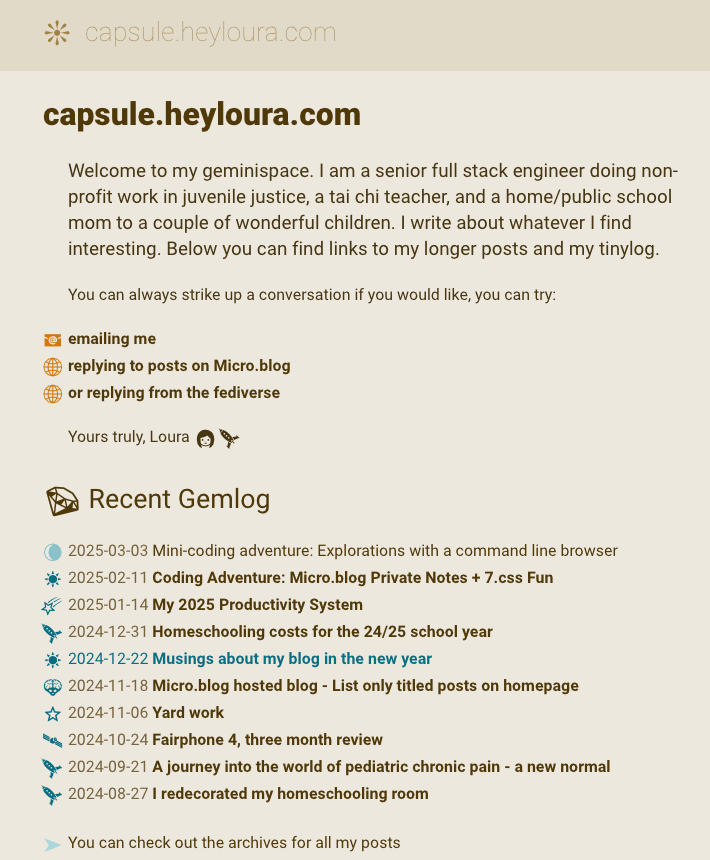
And heyloura.com launched as capsule.heyloura.com 🪐
For those wanting to browse it:
gemini://capsule.heyloura.com/
Otherwise, here is a picture.
Final notes
The code above was simplified for brevity but hopefully I listed enough of the steps that someone else can copy what I did. I’m thrilled that changes I make to my blog are reflected immediately to my Gemini capsule and since it is all driven by Micropub I can use my own little tools for posting and managing content.
I’m enjoying wandering around Geminispace and hope that others are inspired to check it out.
Happy coding everyone, Loura
 Loura
Loura