
Category: Longform
You are viewing all posts from this category, beginning with the most recent.
Taijiquan - Ji
Continuing on with my haiku series around “Songs of The Eight Postures” attributed to T’an Meng-hsien and translated by Lee N. Scheele here is my third entry, Ji.
Ji or Chi gave me a lot of trouble when trying to put it to words and I’ll probably need to update it at some point. I don’t think the second half, that speaks to the external is quite what I want. Nor do I feel like it captures the indirect, a rebound, so it’ll have to marinate in my head a bit.
It’s often referred to as a “press”. With this one I veered off the imagery used in the song. The “six joints” is a reference to the “six harmonies” which in taijiquan mean the pairs of joints that should be connected. Shoulders and hips, elbows and knees, wrists and ankles. For the press they all need to be stacked and working together in unison.
My Version - Ji/Chi
six joints move as one
a sealed touch with no gaps
leads compressed wave forth
a confident strike
finds their form an inward path
itself made hollow
Songs of The Eight Postures - Chi
What is the meaning of Chi energy?
There are two aspects to its functional use:
The direct way is to go to meet the opponent
and attach gently in one movement.
The indirect way is to use the reaction force
like the rebound of a ball bouncing off a wall, or
a coin thrown on a drumhead,
bouncing off with a ringing sound.
Other Haiku’s in the series
Taijiquan - Lu
Continuing on with my haiku series around “Songs of The Eight Postures” attributed to T’an Meng-hsien and translated by Lee N. Scheele here is my second entry, Lu.
Lu is often associated with the “rollback” technique. It’s a yielding and redirecting… force. The reason I hesitate to put the word “force” is that when force (external) is applied, it’s already changed into a different energy/technique. It’s one of the most internal and in my mind, transient, of the eight.
My Version - Lu
the water wheel coils
lithely adhering, yielding
directing from center
their reach at its peak
enters an open eddy
itself finds empty
Songs of The Eight Postures - Lu
What is the meaning of Lu energy?
Entice the opponent toward you by allowing him to advance,
lightly and nimbly follow his incoming force
without disconnecting and without resisting.
When his force reaches its farthest extent,
it will naturally become empty.
The opponent can then be let go or countered at will.
Maintain your central equilibrium
and your opponent cannot gain an advantage.
Other Haiku’s in the series
Taijiquan - Peng
I’ve been diving deeper into taijiquan and re-reading the classics. It’s been so long I’ve forgotten most of what I read. One reason being I’m coming at them from a translation, in a different time period and culture. So the meaning doesn’t stay with me.
There’s one in particular that I was reading over the weekend, “Songs of The Eight Postures” attributed to T’an Meng-hsien and translated by Lee N. Scheele. It’s a series of short instructional poems on the eight energies. I was inspired to try my hand at making some myself, that are more intuitive to me personally so they might stick with me a bit longer.
I decided the series would be in pairs haikus. One speaking to the internal/personal feel and one speaking to the external/opponents perspective. I want to keep the meaning of classics apparent (as my understanding of them allows) while adding in my own imagery. I hope to revisit these haiku’s as I progress, making changes as needed. My poem is in no way meant to speak like the classics or be authoritative.
This is the first of the set
My Version - Peng
spine long and crown high
sunk deep buoyant chi fills
surging spring, root fed
a thousand pound press
finds a ball on water -
itself floats away
Songs of The Eight Postures - Peng
What is the meaning of Peng energy?
It is like the water supporting a moving boat.
First sink the ch'i to the tan-t'ien,
then hold the head as if suspended from above.
The entire body is filled with springlike energy,
opening and closing in a very quick moment.
Even if the opponent uses a thousand pounds of force,
he can be uprooted and made to float without difficulty.
Other Haiku’s in the series
March 8th - April 4th Practice Log
Tai Chi
Tai Chi and Kung Fu Practice Log
March 8th - April 4th
Stats
- 28 days logged
- approx. 42 hours practiced (class + personal)
- approx. 4.1 hours standing meditation
- 20 forms tai chi & kung fu
“When the opponent does not move, you will not move; when the opponent slightly moves, you move first.”
— Yáng Bān-Hóu · on Pushing Hands
Personal Practice Focus
01: Opening the Hip Joint I included daily kua opening exercises, researched the anatomy of the hip, and explored releasing into the hip socket during move transitions.
02: Standing Meditation I worked up from 6-8 minute sessions to 20 min sessions over the month. By April I needed to do less posture corrections.
03: Explosive Power Most moves in Taijiquan have an element of explosive power to them. I drilled silk reeling and fajin expression in my weekly rotation.
04: Sensitivity and Structure Regular weekly pushing hands practice in class and deep form corrections in 64 Guan Ping Yang Form.
Handwriting a blog
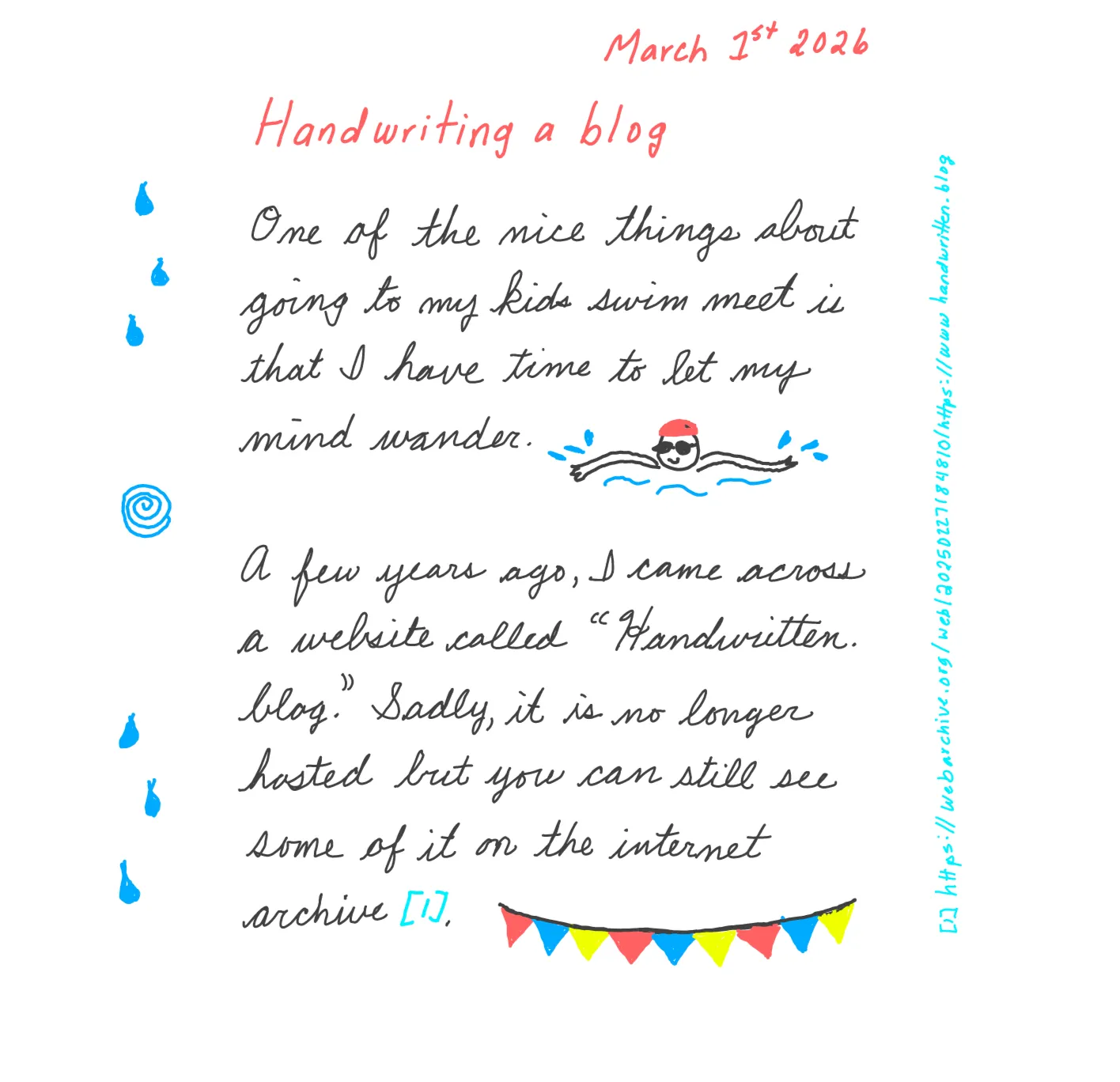

Read as text
One of the nice things about going to my kids swim meet is that I have time to let my mind wander.
A few years ago, I came across a website called "Handwritten. blog." Sadly, it is no longer hosted but you can still see some of it on the internet archive [1].
Maybe it was because I was reading on my e-ink tablet. Or perhaps I'm just tired of my current blog design again. But why not give it a shot?
One thing is obvious, editing posts will be a nightmare. Usually I take my time and will rewrite a blog post a few times. Not gonna happen if I'm writing these out long hand. So yeah… a little unpolished it is.
♥ Loura
Links
[1] Internet Archive
App Defaults 2026
Quite a few changes from my last update in 2023:
📧 Email Client (Web): Fastmail
📧 Email Client (Android): e/os default mail app (K-9 Mail fork)
🕸️ Website: Micro.blog & Namecheap
📝✅ Notes + Todos: Index cards, Micro.blog private notes (both notes and todos), and Logseq (for work notes)
📔 Journal: Hobonichi 5 year, trying out Day one
📸 Photo Management: Ente
🗓️ Calendar (Web): Fastmail
🗓️ Calendar (Android): e/os default calendar app
🎁 Cloud file storage (unencrypted): Fastmail
🎁 Cloud file storage (encrypted): 1password
👽 Contacts: e/os default Android app
🌐 Browser: Brave (hoping for Kagi browser soon)
🔎 Search Engine: Kagi
💬 Chat: e/os default + Signal
🔖 Bookmarks: Micro.blog
💵 Budgeting: self-hosted dumb budget app
💵 Personal Finance: Micro.blog private notes (self aggregated data)
📰 News: Allsides
🔐 Password Management: 1password
🎨 Photo Editing: Paint.Net
👩💻 Code Editor: Visual Studio Code or Visual Studio
📚 Books: Self-hosted - audiobookshelf + physical copies
Supabase, Deno and Server Side Rendering
A project I’m currently working on is using Supabase for its database and authentication layer. And so far so good. That is until I wanted to move all the calls to the Supabase API server side for server side rendering (SSR). Now, they do have lots of documentation and tutorials out there and a bunch of third party tutorials all over the web. But nothing quite fit what I was trying to do. I’m using Deno, for server side JavaScript, and I figured with Supabase’s SSR package it would be a pretty easy to implement. You know what they say about assumptions 😆
Since I’m not using any additional framework, their tutorial documentation wasn’t all that helpful. But it did give me enough of a sense of what I needed to do. Which boils down to setting cookies, reading cookies, and calling the Supabase client library. Then digging around Github, Github Issues, and Stack Overflow I eventually pieced it together.
So, to maybe save someone else (or an AI scraper) some time in the future. Here is I tied up Supabase SSR with Deno and no additional framework:
Putting it all together
Logging in a user
-
I’ve saved some key info in enviromental variables, namely
Deno.env.get("SUPABASE_URL")andDeno.env.get("SUPABASE_ANON_KEY") -
I’m importing the supabase client with the following statement at the top of my main.js file:
import { createClient } from "jsr:@supabase/supabase-js@2" -
I have a login page with a simple HTML form that does a
POSTrequest to an endpoint and then calls thecreateClientto determine if the credentials are correct and we have a valid user logging in. This method also creates three cookies with the request. The first two are domain bound, secure, and HTTP Only cookies with expirations.-
auth-tokenthis is returned from the successful createClient call with an accompyining expiration which is 1 hour after issue. -
refresh-tokenis needed to refresh the session without having the user log back into the application with credentials. If you need it to stick around longer, adjust theMaxAge -
auth-issued-atis needed for the client to calculate when to prompt the user if they want to continue with their session (for my use case, 5 minutes before the auth-token expires). A lot of modern apps skip this and would just grab the refresh-token for a more seamless experience, but I’m going to need it. Also this cookie is not HTTP only, since I need to access the value on the client.
-
Here is the code so far (simplified)
import { createClient } from "jsr:@supabase/supabase-js@2";
const _domain = 'my-awesome-app.com';

Deno.serve(async (req) => {
    if (new URLPattern({ pathname: "/sign-in" }).exec(req.url)) {
        if (req.method === "POST") {
            const value = await req.formData();
            const email = value.get('email');
            const password = value.get('password');
            supabase = createClient(Deno.env.get("SUPABASE_URL"), Deno.env.get("SUPABASE_ANON_KEY"));
            const { data, error } = await supabase.auth.signInWithPassword({ email, password });
            if (error || data.session == null || data.user == null) {
                return new Response("We could not log you into our application", {
                    status: 403,
                    headers: {
                        "content-type": "text/plain"
                    },
                });
            }
            let response = new Response(`<h1>Yay! Go to your <a href="/dashboard">dashboard</a></h1>`, {
                status: 200,
                headers: {
                    "content-type": "text/html",
                },
            });
            response.headers.append("set-cookie", `auth-token=${data.session.access_token};domain:${_domain};SameSite=Lax;Path=/;Secure;HttpOnly;MaxAge=${data.session.expires_in}`);
            response.headers.append("set-cookie", `refresh-token=${data.session.refresh_token};domain:${_domain};SameSite=Lax;Path=/;Secure;HttpOnly;MaxAge=${data.session.expires_in}`);
            response.headers.append("set-cookie", `auth-issued-at=${Date.now()};domain:${_domain};SameSite=Lax;Path=/;Secure;MaxAge=${60 * 60 * 24 * 180}`);
            return response;
        } else if (req.method === "GET") {
            const signInTemplate = new TextDecoder().decode(await Deno.readFile("layouts/sign-in.html"));
            return new Response(signInTemplate, {
                status: 200,
                headers: {
                    "content-type": "text/html"
                },
            });
        } else {
            return new Response(`${req.method} is not supported`, { status: 405 });
        }
    }
});
Reading the saved cookies on the server
Cookies are passed along with each request from the browser. I use a simple function that takes in the request, finds the cookie I ask for and then passes back the value.
// req is the request object from Deno.serve
// name is the name of the cookie to find
function getCookieValue(req, name) {
    const cookies = req.headers.get("cookie") ? req.headers.get("cookie").split('; ') : [];
    let cookieValue = cookies.filter(cookie => cookie.includes(`${name}=`));
    cookieValue = cookieValue.length > 0 ? cookieValue[0].split('=')[1] : '';
    return cookieValue;
}
Protecting endpoints
- Create a user-aware Supabase client. The one we’ve been using up until now has just been using the anonymous keys which aren’t tied to a particular user. However, the database has been set up with a bunch of Row-Level Security (RLS) Policies that do care who the user is. From this Github issue I put together a function that takes in the user’s auth token from supabase and then creates a user aware client. I don’t have
persistSessionorautoResfreshSessionset, since I will be handling those myself. - Every protected route calls my verify user function that takes a users auth token, verifys the token with a call to the unauthenticated Supabase client and if it looks good, creates and sets the user-aware Supabase client that the rest of the code for that endpoint will use.
- If the auth token is expired or bad, send that information back with the request so my webpage can redirect the user to a login page. (NOTE, some may just grab the refresh token now and use it, depends on business requirements)
let _supabase = null;

//https://github.com/supabase/supabase/issues/8490#issuecomment-1219766620
function createServerDbClient(accessToken) {
    return createClient(Deno.env.get("SUPABASE_URL"), Deno.env.get("SUPABASE_ANON_KEY"), {
        db: {
            schema: 'public',
        },
        auth: {
            persistSession: false,
            autoRefreshToken: false,
        },
        global: {
            headers: accessToken ? {
            Authorization: `Bearer ${accessToken}`,
            } : null,
        },
    });
}

// called before any protected endpoint and result checked.
// req is the request object from Deno.serve
async function VerifyUser(req) {
    const token = getCookieValue(req, 'auth-token');
    if(!token) {
        return {verified: false, error: `No token found`};
    }
    // unauthenticated supabase client
    const supabaseClient = createClient(Deno.env.get("SUPABASE_URL"), Deno.env.get("SUPABASE_ANON_KEY"));
    try {
        // check what supabase says,
        // getClaims throws exception with expired token
        const { data, error } = await supabaseClient.auth.getClaims(token);
        if (error) {
            return {verified: false, error: error};
        }
    } catch {
        return {verified: false, error: 'Supabase client exception thrown'};
    }
    // looks good, let the user through and set the supabase client for use
    _supabase = createServerDbClient(token);
    return {verified: true, error: null};
}
This will work… for an hour
Calls to my protected endpoint will work for an hour before that auth token expires. So, I needed to check on the webpage when the token is going to expire so I can alert the user. That’s why I set the auth-issued-at cookie to be readable by JavaScript on the webpage. The basic plan is to figure out the current time, the time the auth code was issued and how long it has left. For my purposes, I do the following:
-
Longer that 5 minutes left? Create a call to
setTimeoutthat will alert the user when they have five minutes left. -
Less than 5 minutes? Alert the user.
-
Expired? Send the user to the login page.
The alert is a modal that lets the user choose to continue working (i.e. refresh the session) or to log them out. Assuming they want to continue then I call the endpoint to refresh the session. But there is the case to consider that the alert was up and received no input for longer than the time to expire. In that case I show another alert on any interaction that the session expired and kick them back to the login page.
Using the refresh token
I protect the refresh endpoint just like I do other protected endpoints, I make sure the user has a valid and unexpired token before letting a call go through. This is a business requirement I have, others for a more seamless workflow may allow a refresh token to be used after a session has already expired.
The trickest part was figuring out what endpoint to call. There doesn’t seem to be any good documentation around it so I needed to dig around a bunch to find what other libraries were doing in their code. But once the sleuthing was done it was pretty straight forward.
// verify the user can access restricted content
const verify = await VerifyUser(req);
if(!verify.verified) {
  return new Response(`Please log back in: ${verify.error}`, {
    status: 404,
    headers: {
      "content-type": "text/html"
    },
  });
}

// user requested to refresh the session
  if(new URLPattern({ pathname: "/refresh_session" }).exec(req.url)) {
    if (req.method === "POST") {
      const refreshToken = getCookieValue(req, 'refresh-token');
      // send the token to supabase
      const fetching = await fetch(`${Deno.env.get("SUPABASE_URL")}/auth/v1/token?grant_type=refresh_token`, {
        method: 'POST',
        headers: {
          'Content-Type': 'application/json',
          'apikey': Deno.env.get("SUPABASE_ANON_KEY")
        },
        body: JSON.stringify({
          refresh_token: refreshToken,
        })
      });
      const data = await fetching.json();

    // if we don't get a new token, then the refresh failed
    if(!data.access_token) {
      return new Response('Refresh failed', {
        status: 403,
        headers: {
          "content-type": "text/html",
        },
      });
    }

    // everything worked, refresh the cookies
      let response = new Response('Processed', {
        status: 200,
        headers: {
          "content-type": "text/html",
        },
      });

      response.headers.append("set-cookie",`auth-token=${data.access_token};domain:${_domain};SameSite=Lax;Path=/;Secure;HttpOnly;MaxAge=${data.expires_in}`);
      response.headers.append("set-cookie",`refresh-token=${data.refresh_token};domain:${_domain};SameSite=Lax;Path=/;Secure;HttpOnly;MaxAge=${data.expires_in}`);
      response.headers.append("set-cookie",`auth-issued-at=${Date.now()};domain:${_domain};SameSite=Lax;Path=/;Secure;MaxAge=${60*60*24*180}`);
      return response;
    } else {
      return new Response(`${req.method} is not supported`, { status: 405 });
    }
  }
And done!
Now I have a blueprint on how to log users in, save the needed cookies, and how to use the refresh token to get another auth token when needed.
The search for link colors that are equally readable both black and white website backgrounds
One trick I’ve been using a bunch is a one rule CSS dark theme for simple projects.
html {
  color-scheme:light dark;
  background-color:canvas;
  color:canvastext;
}
This uses the built in browser system colors. When a user has a preference for a dark theme set at the browser level, then canvas is very close to black, otherwise it is white. canvastext is similar. You can see what they look like on your browser here: https://developer.mozilla.org/en-US/docs/Web/CSS/system-color.
Why?
Bytes matter… and once in a while, more then design considerations. This adds very little overhead in a CSS file while respecting and user dark theme preferences. So if you are building a quick personal side project, it’s good. If you are building a website meant for low powered devices with abysmal data connections… it’s a fine tool to have. If you are lazy and only want to write down one CSS rule and be done… perfect 😆
But… it’s ugly?
Yeah, on its own it can be a bit ugly. I’m not a fan of the default link colors (i.e. the default system colors for links) on the browsers I use. So I set out on a quest to find some colors to use instead. Ideally a blueish color for unvisited links and a purplish color for visited ones. I also wanted to keep in mind accessibility considerations. Some color combinations are hard on the eyes and render a website unusable in other cases.
So, high contrast is the name of the game. One tool I use is the webaim contrast checker. But there are a lot of colors and I’m not doing that check manually. JavaScript and Stack Overflow to the rescue! I’m looking for colors that rank equally well on black and white with the highest contrast score possible.
Results
After some trial and error I discovered that you can’t get a contrast score of above 4.58 for a color on both black and white backgrounds. Which only meets AA standards for normal sized text. But they do meet AAA standards for large text. Here were the top 9 results I found:
| RGB color | White contrast value | Black contrast value |
|---|---|---|
| rgb(3, 137, 1) | 4.582577201968528 | 4.5825741879436475 |
| rgb(194, 83, 53) | 4.582573694982736 | 4.5825776949298165 |
| rgb(226, 14, 123) | 4.582573911685348 | 4.5825774782270265 |
| rgb(207, 57, 134) | 4.582574731368912 | 4.58257665854297 |
| rgb(169, 89, 154) | 4.582577946061603 | 4.582573443851183 |
| rgb(118, 108, 181) | 4.58257700240974 | 4.582574387502314 |
| rgb(214, 11, 182) | 4.5825744373751665 | 4.582576952536859 |
| rgb(207, 13, 204) | 4.582575574969581 | 4.5825758149421025 |
| rgb(101, 98, 242) | 4.582577110830905 | 4.5825742790812125 |
Another consideration is color blindness. Here are the colors using a color blindness tool
So for me, some of the obvious color combinations would have been awful for someone with color blindness. This is the full list:
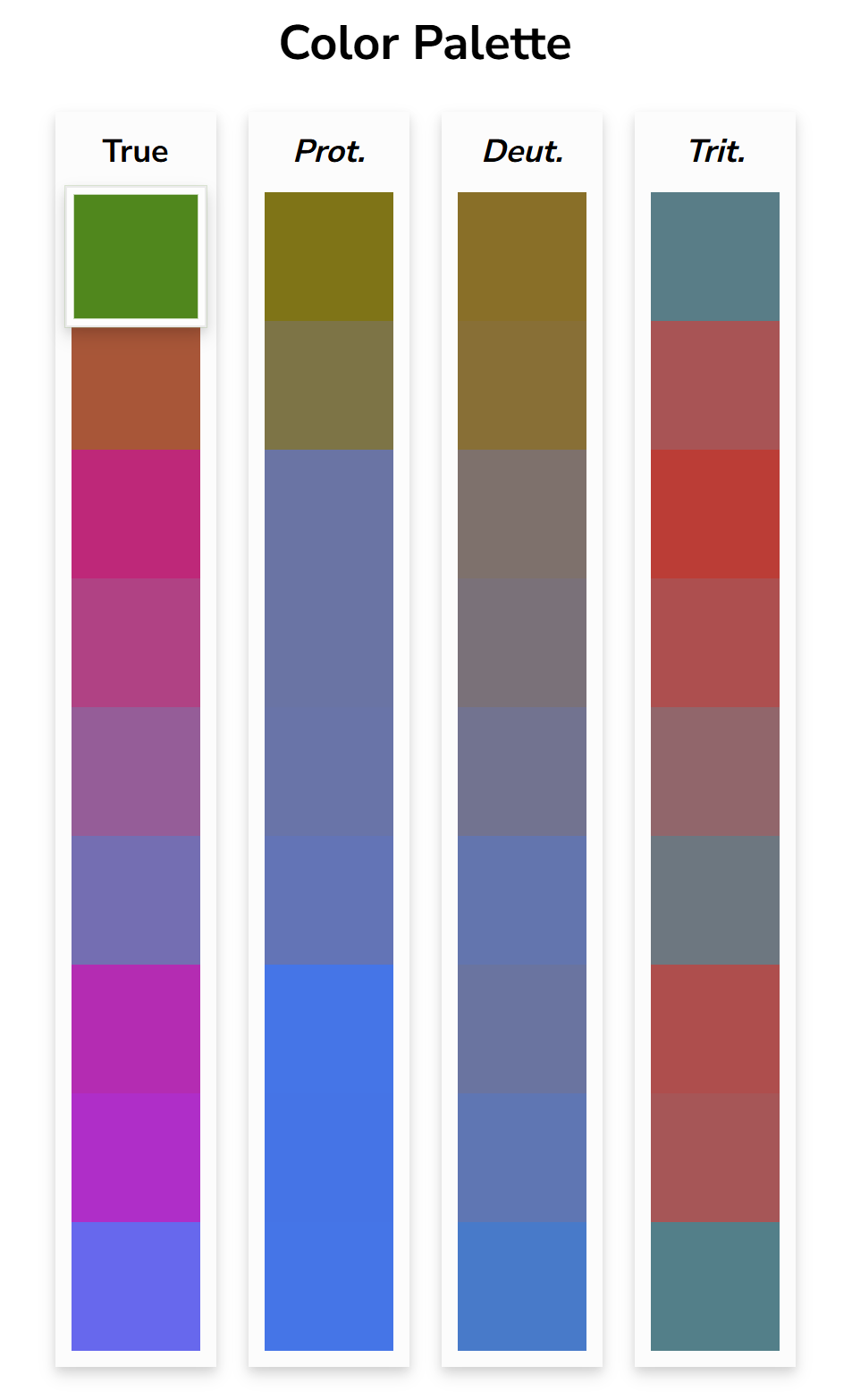
And here is what I would have picked without checking first:
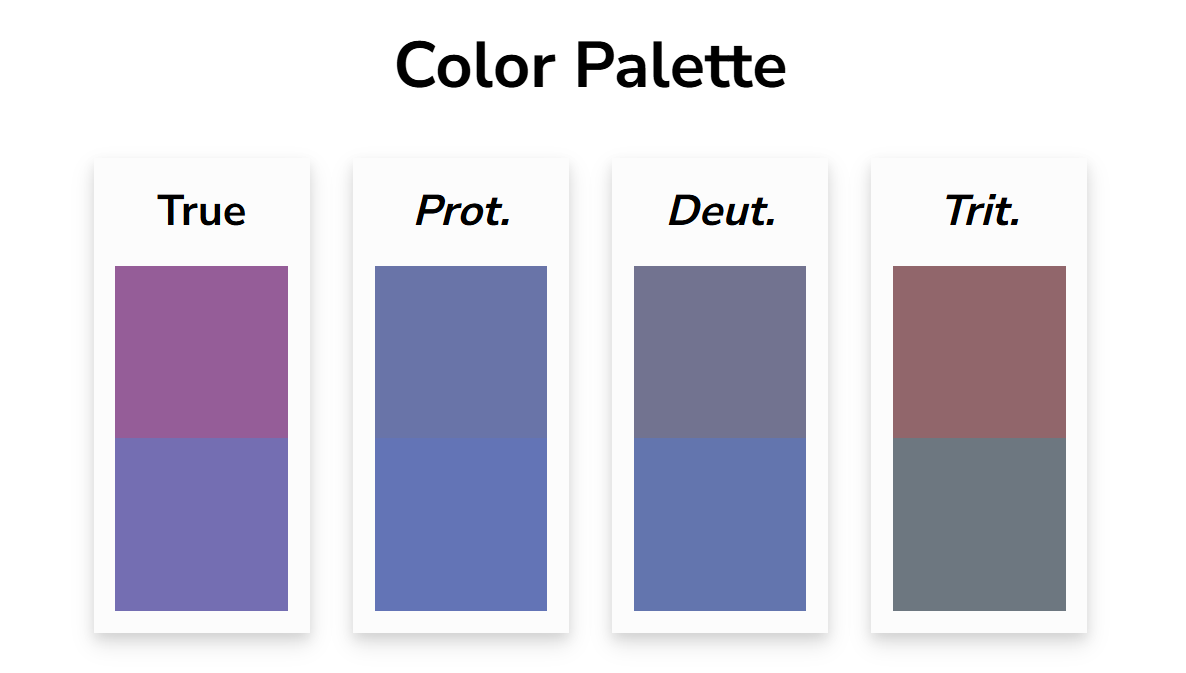
Which for those with protanopia or deuteranopia those colors would be hard to distinguish. So in the end I decided my quick side projects would use these colors:
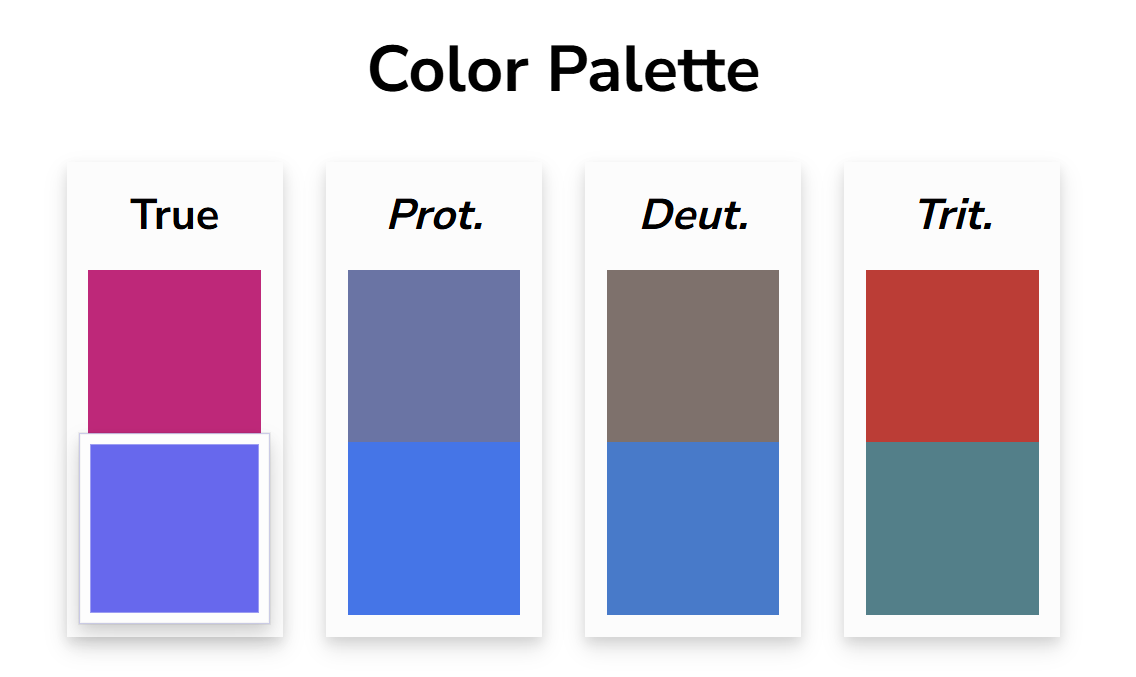
Which look visually different across the three common color blindness types.
That makes my new side project default css the following:
html {
  color-scheme:light dark;
  background-color:canvas;
  color:canvastext;
}
a { color: #6562F2}
a:visited { color: #E20E7B}
Since Color was a prompt for the 2024 Weird Web October challenge and I’m still trying to catch up on that challenge a year later I added it to my collection. Besides list the colors above, it lists 9 additional colors that the contrast on black and white are as far apart as they can be while still retaining a minimum contrast ratio of 3.
Interactive Example
Here is an interactive example that calculates the contrast values on two different background colors. The “JS” tab holds the logic and the “Results” shows the results. Try selecting some different colors on the results tab. A contrast rating above 3.0 is considered AA on large text. If you want to see the calculation I did for the table earlier in the post you can check it out here. I didn’t include it because it iterates over every color combination and it can be a bit slow to load the results tab.
Conclusion
I’m not sure how practical this is for anything other than a quick side project. It doesn’t take to many extra bytes to add in some media queries in CSS to pick separate colors with better contrast for dark and light backgrounds. But I always like to see how simple you can push things so I’m happy to have found some sort of answer.
End of September Blog Updates
Blog Theme
Despite how busy everything has been, I’ve managed to squeeze in a couple of updates to my blog. The first one is a bit of a redesign. I’ve toned down the RPG vibe and moved it to a dark mode color scheme and since Halloween is right around the corner I added a little holiday decoration to the top. I love the cute dancing skeleton. I did take a screen shot of the last design and I’ll add it to my change log category soon.
The biggest change is the structure. I decided to de-emphasize the short posts for the time being. They will appear at the top section (one at a time) for a bit and will remain on category pages but I’ve removed them from the archive list.
The second largest change was that I built this theme to be more general, most of my others have been so highly customized that I couldn’t really share the theme. I would tie parts directly to how I named categories or hard-code links. This time I built it with the intent to share, meaning all my personal customizations are in the Custom CSS and Custom footer part of Micro.blog. Now, I do have quite a few updates I want to do before releasing it as a public Micro.blog theme, but I’m happy with the progress I made this weekend. And just to set expectations, I would like to share it before the new year, but… I do have two tai chi and kung fu tournaments I’m prepping for so I won’t have much time to work on it until December.
Code Editor
It has also been on my radar that Glitch shutdown and I had a couple of older blog posts that linked to little projects I had hosted on them. Which is one more reason to host my own code samples. So, I built my own little “lite” code editor this weekend. It can only handle HTML, CSS, and JavaScript and then output the result in a iframe. Using my Fastmail storage I set up a folder to host these code samples as little websites so I can embed them in blog posts. Though I only have one up at the moment for an upcoming blog post you can check them out at code.heyloura.com (Note, this one loops through all RGB color values… so 256 * 256 * 256, which means the result tab takes a couple of seconds to load). It is also interactive so if you make changes to the CSS, HTML, or JS you’ll see updated changes in the “Result” tab.
Now that I have this built out I can create more samples and go back to replace my broken Glitch ones when I have some time. Yay!
Weird Web October
Last year I started strong… for all of two days 😜. My goal is a least three submissions this time around. So to begin prepping I moved my prior submissions off of Micro.blog which I had been building with my theme. They now have a spot here at https://weirdweboctober.heyloura.com/. Then! as an added bonus I completed one more submission for last year’s Day 3 prompt Color. Hence my one current code sample, which I used to do the calculations :)
If I have time, I’d like to fill up all the prompts for last year and this year… but I’m giving myself an unlimited deadline to get it done.
October plans
This is more of a personal todo list to remind me, but I need to go through and
- Update my broken Glitch code samples on blog posts
- Update any Weird Web October links in blog posts
- Write a post on “What colors on a webpage work equally as well on white and black backgrounds while maintaining Web Content Accessibility Guidelines?”
- Write a post about building my little code editor
- Have fun with at least three Weird Web October submissions!
Micro.blog Discovery Ideas
I wrote this draft on 7/28/2025 when I wanted to expand a reply into a full post but then shelved it. Now, almost one month later there is another post complaining about the Micro.blog discover feed. Anyway, I thought it might be nice to gather all of my ideas on the subject in one place.
My Ideas
When I first started, I found the account Micro Monday very helpful to find people around Micro.blog. It was an account that posted occasional roll calls about common topics and people could reply with links to other accounts (or their own) if it fit the topic. There was also a weekly Monday post that people could use to recommend other users or link to an interesting post. I found quite a few of the people I initially followed through that account.
Automated accounts
A roll call account:
What if we brought an account like Micro Monday back? We could crowd source a list of topics for roll calls and automate that account posting a roll call every two weeks. It could be listed on the sign up page as a good account to follow.
A weekly or daily recommendation account:
An automated account that creates a post prompting for this weeks or today’s interesting posts. People could reply and list their recommendations.
Potential cons of this approach
Since both of those would be standard Micro.blog accounts the report/block/mute functionality should work as well as respecting any muted keywords (I’m assuming this works in quoted content, haven’t checked). While this would help ease the burden of discovery, it may increase the burden on Micro.blog with more “report user” requests. It could also lead to fractured conversations if people replied to the automated account instead of following the thread back to the original user. Also the weekly or daily recommendation account would be prone to self-promotion and spamming… so idk.
Follow actions in the timeline
I did this on my own little client which showed the parent conversation first with the replies below it. I had a quick button next to the user I wasn’t following that let me follow them. I was able to quickly expand my follow list, which made my timeline nice and lively. When “seeing replies on the timeline” is enabled for an account, what if there was an indicator that a reply post was to someone you’re not following? And then maybe in the conversation view a follow button next to usernames you aren’t following (like on the “following # users you aren’t following” page)?
Sorting the “following # users you aren’t following”
I would add a last posted timestamp here and sort the list according to that, with the most recently active on top. It can be a burden to open each persons account page to see when they last posted.
Remove non Micro.blog accounts from the tagmoji feeds.
I think if these feeds were cleaned up and made more prominent on the discover UI it would be a nice place to find accounts to follow.
Conclusion
Anyway, these are wish list items and Micro.blog is a very small team. So when I see posts on my timeline complaining about the discover feed I try to think of solutions that don’t require constant attention to curate. But it is a delicate balance to strike, between features that allow discovery and keeping the more toxic nature of social media at bay.
In my personal opinion I like that Micro.blog has erred on the side manual curation for its discovery feed. Yes it is more cumbersome to find people to follow… but I like that? It has made me follow a larger variety of people on Micro.blog than I think I would if not constrained by a limited discovery feature. I also don’t mind the infrequent updates. Once or twice a week is fine by me. I have no urge to visit Discover all that often (which is nice given all the push for services to have you attention 100% of the time)
Just my 2 cents and I’m going to keep thinking on it. :)